VulnFeed
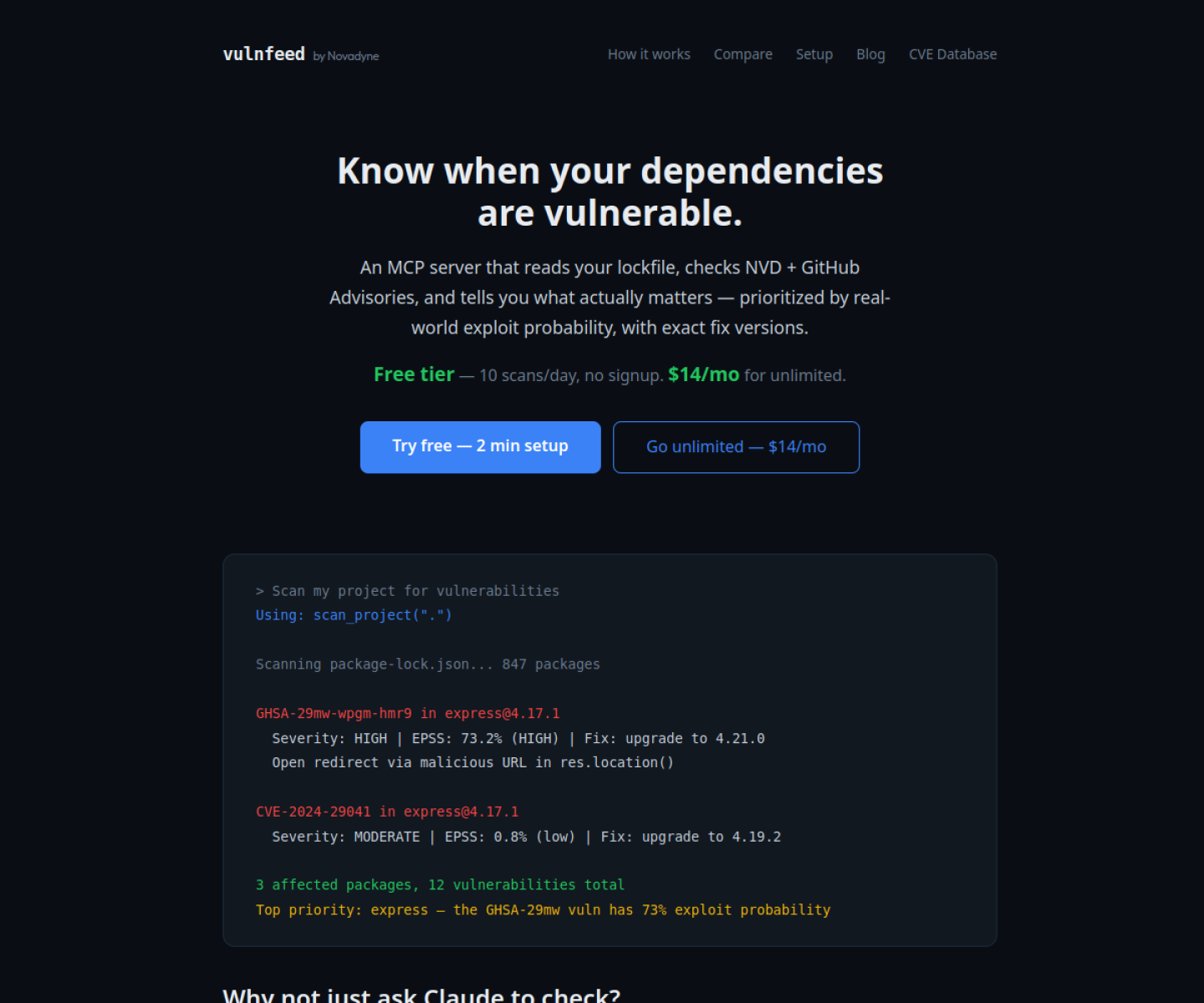
Dependency vulnerability monitoring MCP server that reads a project's lockfile, checks public advisory sources, prioritizes by exploit probability, and recommends concrete fix versions.
AI Project Details
VulnFeed review: Dependency vulnerability monitoring MCP server that reads a project's lockfile, checks public advisory sources, prioritizes by exploit probability, and recommends concrete fix versions.
VulnFeed is aimed at developers who want security checks available directly inside an ai-assisted coding workflow instead of bouncing out to separate dashboards. The current product materials describe a workflow built around install the mcp server, scan a project or lockfile, review prioritized vulnerabilities and suggested upgrade versions, then revisit the same project later for continuous monitoring and alerts. That makes the page easier to read as an operating model, not just a brand claim.
Why it is timely
VulnFeed is centered on dependency-aware MCP workflows rather than generic CVE lookup. Its use of EPSS prioritization makes the output more actionable than a raw advisory list. The product page is clear about tool coverage, public data sources, and flat-rate pricing.
How the workflow works in practice
A sensible first pass is to start from the product's main entry point and test the shortest path to value. For VulnFeed, that means users should install the mcp server, scan a project or lockfile, review prioritized vulnerabilities and suggested upgrade versions, then revisit the same project later for continuous monitoring and alerts. If that loop reduces review drag, coordination, or governance work, the product is doing something real.
Where VulnFeed stands out
| Evaluation angle | Fit | Why it matters | | --- | --- | --- | | Best-fit user | High | Developers who want security checks available directly inside an AI-assisted coding workflow instead of bouncing out to separate dashboards. | | Core workflow clarity | High | Install the MCP server, scan a project or lockfile, review prioritized vulnerabilities and suggested upgrade versions, then revisit the same project later for continuous monitoring and alerts. | | Switching cost reducer | Medium to high | VulnFeed is centered on dependency-aware MCP workflows rather than generic CVE lookup. | | Adoption risk | Medium | The current positioning is strongest for dependency and lockfile security, not broader application security review. |
Practical use cases
- Scanning a repository's dependency tree from an MCP-connected coding workflow
- Prioritizing which package vulnerabilities are actually likely to matter
- Getting concrete fix-version guidance instead of only a CVE label
Limits and buying notes
The current positioning is strongest for dependency and lockfile security, not broader application security review. Teams still need their own policy for when to patch, suppress, or defer lower-signal findings. Pricing status today: VulnFeed's official site lists a free tier with 10 scans per day and an unlimited plan at $14 per month.
FAQ
What is VulnFeed best for?
VulnFeed is strongest when scanning a repository's dependency tree from an mcp-connected coding workflow matters more than a generic AI demo. The official product materials position it around a concrete workflow rather than a blank chatbot shell.
Who should try VulnFeed first?
Developers who want security checks available directly inside an AI-assisted coding workflow instead of bouncing out to separate dashboards. Teams with a real workflow match will get value faster than general curiosity users.
What should buyers verify before adopting VulnFeed?
The current positioning is strongest for dependency and lockfile security, not broader application security review. Teams still need their own policy for when to patch, suppress, or defer lower-signal findings. Pricing, privacy, and workflow fit should be checked directly on the current product before rollout.
Reviewed sources
- https://vulnfeed.novadyne.ai/
- https://news.ycombinator.com/item?id=48558710
- https://vulnfeed.novadyne.ai/blog
FAQ
What is VulnFeed best for?
VulnFeed is strongest when scanning a repository's dependency tree from an mcp-connected coding workflow matters more than a generic AI demo. The official product materials position it around a concrete workflow rather than a blank chatbot shell.
Who should try VulnFeed first?
Developers who want security checks available directly inside an AI-assisted coding workflow instead of bouncing out to separate dashboards. Teams with a real workflow match will get value faster than general curiosity users.
What should buyers verify before adopting VulnFeed?
The current positioning is strongest for dependency and lockfile security, not broader application security review. Teams still need their own policy for when to patch, suppress, or defer lower-signal findings. Pricing, privacy, and workflow fit should be checked directly on the current product before rollout.