brain-map
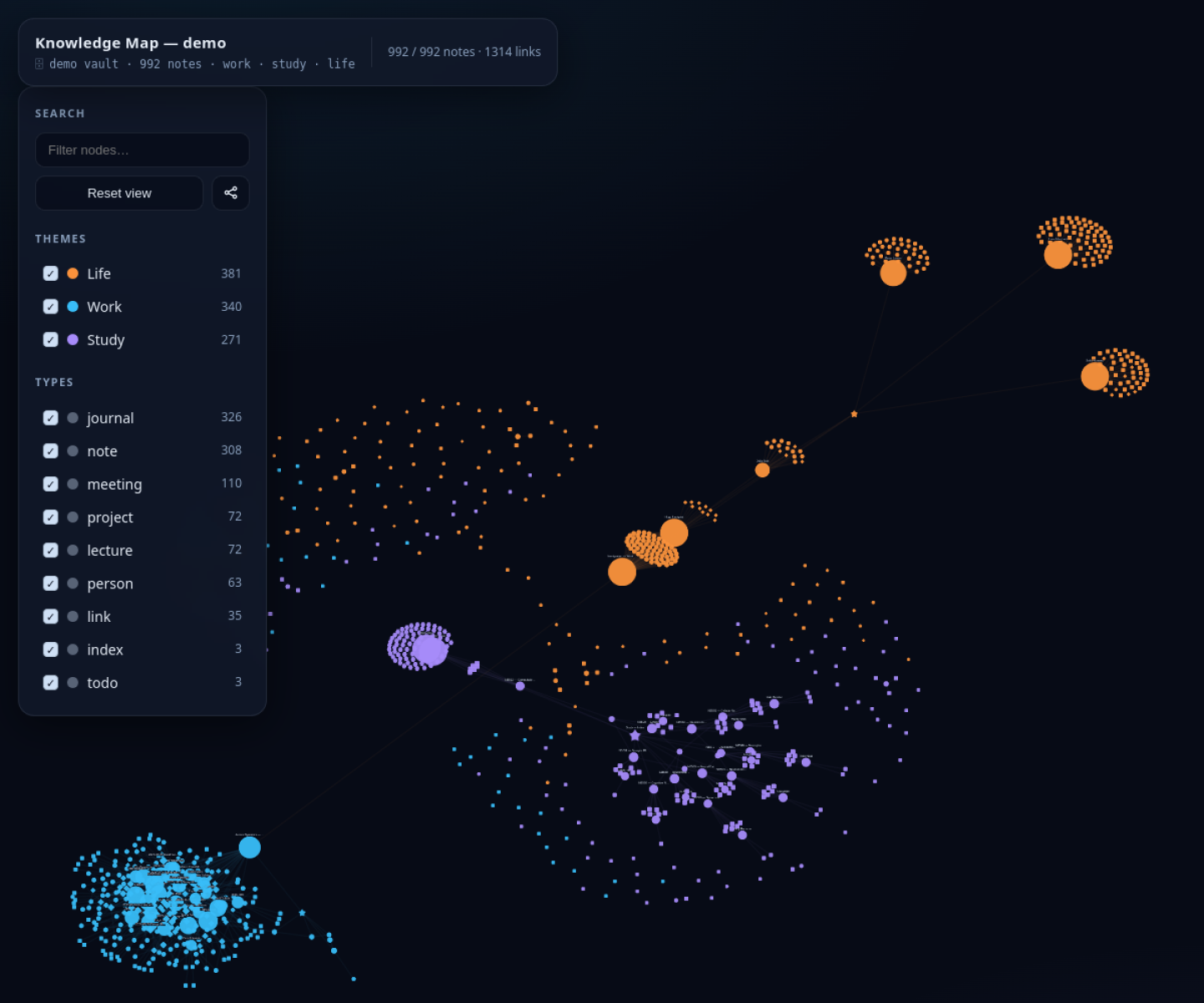
Agent-friendly note visualization tool that turns a Markdown or Obsidian vault into an interactive graph, timeline, and inspection surface without requiring a hosted knowledge app.
AI Project Details
brain-map review: Agent-friendly note visualization tool that turns a Markdown or Obsidian vault into an interactive graph, timeline, and inspection surface without requiring a hosted knowledge app.
brain-map is built for people managing large markdown note sets who want agents or humans to see structure, growth, and relationships more clearly than a file tree allows. Instead of asking users to replace their whole toolchain, the product wraps a familiar workflow around point the builder at a notes directory, generate a self-contained interactive html map, then inspect themes, links, and timeline growth in the browser or through an agent skill. That makes it easier to judge on practical fit rather than hype.
What the product changes day to day
The real question is whether the workspace removes enough friction to matter. brain-map is useful because it produces a portable inspection artifact instead of another proprietary note dashboard. The repo is concrete about Obsidian support, self-contained HTML output, timeline playback, and optional precomputed layouts. It fits agent workflows because the same vault can remain plain Markdown while gaining a clearer visual surface for exploration.
What the workflow feels like
For a serious evaluation, start with one active project instead of a synthetic demo. In practice that means users should point the builder at a notes directory, generate a self-contained interactive html map, then inspect themes, links, and timeline growth in the browser or through an agent skill. If the product keeps context visible and cuts down tool hopping, the value shows up quickly.
Where it earns attention
| Evaluation angle | Fit | Why it matters | | --- | --- | --- | | Best-fit user | High | People managing large Markdown note sets who want agents or humans to see structure, growth, and relationships more clearly than a file tree allows. | | Core workflow clarity | High | Point the builder at a notes directory, generate a self-contained interactive HTML map, then inspect themes, links, and timeline growth in the browser or through an agent skill. | | Switching cost reducer | Medium to high | brain-map is useful because it produces a portable inspection artifact instead of another proprietary note dashboard. | | Adoption risk | Medium | The output is strongest for linked Markdown knowledge bases; sparse or poorly structured notes will not magically become insightful maps. |
Practical use cases
- Visualizing an Obsidian or Markdown vault as a graph and timeline
- Giving agents a clearer structural view of a personal knowledge base
- Sharing a portable HTML knowledge map without moving notes into a new app
Limits and buying notes
The output is strongest for linked Markdown knowledge bases; sparse or poorly structured notes will not magically become insightful maps. Users still need to maintain naming, folders, or links with some discipline for the visualization to stay meaningful at scale. Pricing status today: brain-map is distributed as an open-source project and the reviewed public sources did not expose a paid pricing page.
FAQ
What is brain-map best for?
brain-map is strongest when visualizing an obsidian or markdown vault as a graph and timeline matters more than a generic AI demo. The official product materials position it around a concrete workflow rather than a blank chatbot shell.
Who should try brain-map first?
People managing large Markdown note sets who want agents or humans to see structure, growth, and relationships more clearly than a file tree allows. Teams with a real workflow match will get value faster than general curiosity users.
What should buyers verify before adopting brain-map?
The output is strongest for linked Markdown knowledge bases; sparse or poorly structured notes will not magically become insightful maps. Users still need to maintain naming, folders, or links with some discipline for the visualization to stay meaningful at scale. Pricing, privacy, and workflow fit should be checked directly on the current product before rollout.
Reviewed sources
- https://github.com/vladignatyev/brain-map-skill
- https://vladignatyev.github.io/brain-map-skill/
- https://raw.githubusercontent.com/vladignatyev/brain-map-skill/main/README.md
- https://news.ycombinator.com/item?id=48514124
FAQ
What is brain-map best for?
brain-map is strongest when visualizing an obsidian or markdown vault as a graph and timeline matters more than a generic AI demo. The official product materials position it around a concrete workflow rather than a blank chatbot shell.
Who should try brain-map first?
People managing large Markdown note sets who want agents or humans to see structure, growth, and relationships more clearly than a file tree allows. Teams with a real workflow match will get value faster than general curiosity users.
What should buyers verify before adopting brain-map?
The output is strongest for linked Markdown knowledge bases; sparse or poorly structured notes will not magically become insightful maps. Users still need to maintain naming, folders, or links with some discipline for the visualization to stay meaningful at scale. Pricing, privacy, and workflow fit should be checked directly on the current product before rollout.